Most architecture work starts with a requirement you argue against. Someone wants a thing, they write down what the thing must do, and your job is to build something that satisfies the list while pushing back on the parts that are wrong. The list is the ground you stand on. An earlier private cloud I worked on, CertaScale, had that ground: the customer wanted their existing enterprise network, with its static IPs and VLANs and QoS, to work unchanged on Kubernetes, and that one hard requirement drove years of engineering. You always knew what you were building against.
This project had no list. A government customer in the Gulf wanted a private cloud with Kubernetes on top. That was the whole brief. When I asked what they needed it to do, who would use it, what workloads it had to carry, the answers came back as versions of “we will know when we have it.” They were certain they wanted the capability and had no picture of what it was for. I produced a design document that ran past a hundred pages, and almost none of that length came from the requirements, because there weren’t any. It came from inventing them first.
Table of contents
Open Table of contents
A brief with one sentence in it
The usual shape of a job like this is that the customer has an application, or a fleet of them, and the cloud is a means to run those applications better. You can measure a design against the workloads it has to carry. Here the customer was a government body that wanted to offer Kubernetes to other teams inside and around the organisation, without knowing who those teams were or what they would run. The cloud was the product, and the product had no named users yet.
That leaves you with nothing to satisfy and nothing to say no to. You cannot pick a network plugin for workloads you cannot see, or size a cluster for demand nobody has estimated, or choose an isolation model without knowing whether the tenants trust each other. Every question I would normally answer by reading the requirements now had to be answered by guessing what the requirements would eventually turn out to be.
Inventing the requirements
So I invented the tenants. Not real ones, but plausible ones, the kinds of teams a government data-and-AI organisation would end up serving if the platform succeeded. An AI team that needs GPUs and will be furious if each notebook holds a whole card hostage. An application team that wants a database and does not want to file a ticket and wait a week for it. Teams that need somewhere to push container images. Teams running workloads they do not fully trust, next to teams whose data must never leak sideways. Once those imagined tenants existed, they started asking for things, and their questions became the requirements the customer never gave me.
This felt strange to write down as engineering, because it looks like fiction. But there is no other way to design a platform whose users have not arrived. You build the requirements from the demands the platform will provoke once it exists, and you check each demand against what a real organisation of that type actually does.
That still leaves the hardest question: how do you choose between options when there is no requirement to declare one better? A spec would tell you. Without a spec I fell back on two questions that stand in for “best” whenever it has no definition:
- Does this lock us in? A platform with no known future should keep as many doors open as it can, because you cannot predict which one the customer walks through.
- Is it already paid for? The customer had existing licences and tools. Something already in the toolchain costs nothing more and carries support they have already bought.
Those two questions decided more of the architecture than any technical benchmark did, and in at least one place they made me pick the weaker option on purpose.
A menu, not a product
The first thing the imagined tenants disagreed about was how much of Kubernetes they wanted to run themselves. A team with no platform engineers wants the cluster handed to them working. A team with strong opinions and compliance rules wants control of the nodes. You cannot serve both with one offering, and since I did not know which kind of tenant would show up, I designed for the range rather than a point.
That range came out as three tenancy models. In the managed model the provider runs everything up to and including the control plane and worker nodes, and the tenant brings only workloads. In the tenant model the provider keeps the control plane but the worker nodes belong to the tenant. In the unmanaged model the provider supplies virtual machines and the physical floor beneath them, and the tenant owns Kubernetes itself. They trade ease of use against control, and each one moves a line further down the stack from the provider to the tenant.
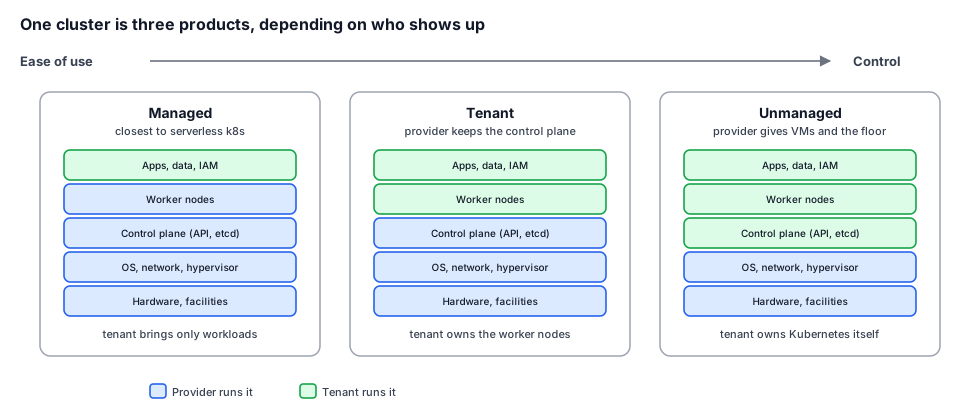
If that split feels familiar, recolour it blue and orange and you’ll know why: it was inspired by, which is to say stolen from, the AWS shared responsibility model, with the provider/tenant line slid up and down the stack to make three products from one cluster.
Building three offerings instead of one is more work, and with real requirements I would have pushed to cut it down to the one the customer needed. With no requirements, the range was the safe answer, because a platform for unknown tenants has to cover the tenant it has not met yet.
Picking the distribution
The tenancy models tell you how much of Kubernetes the tenant runs. They do not tell you whose Kubernetes it is. That was the first decision where the two questions did real work, and where they overruled the feature comparison.
The three candidates were Charmed Kubernetes from Canonical, VMware Tanzu, and Red Hat OpenShift. On features, Charmed was the weakest of the three for what these imagined tenants wanted. Tanzu and OpenShift both do GPU sharing out of the box. Charmed does not. If I were scoring on capability, Charmed loses that row outright, and GPU sharing was going to matter a great deal to the AI tenants I had invented.
Both other options failed the two questions. Tanzu ties you to vSphere, does not support bare metal, and splits its capabilities across a confusing set of editions whose features depend on the vSphere version underneath, which is lock-in on two axes at once. OpenShift is portable enough, but its support was not something the customer had already paid for, and it brought its own opinionated runtime and defaults that would have to be unwound. Charmed had no meaningful lock-in, ran on OpenStack and VMware and bare metal alike, and its support was already covered under an arrangement the customer had. It won on the two tiebreakers I had chosen to stand in for “best” and lost on the feature sheet. So Charmed it was, with the GPU gap logged as a debt to be paid later rather than a reason to reach for a proprietary stack.
This was a real tradeoff, not a free win. Choosing the portable, already-funded option meant accepting that the single most important capability for one of my imagined tenants would not come for free. That bill came due in the next section.
GPU sharing
The AI tenant was the loudest of my invented tenants, because GPUs are the part of this design where waste is most expensive. Most workloads do not need a whole GPU. A low-batch inference server, a Jupyter notebook someone is poking at, a CI job that wants a card only while it runs, all of these hold a fraction of the silicon and leave the rest idle. Hand each of them a dedicated GPU and you buy a rack of the most expensive hardware in the building to run it at a fraction of its capacity. Sharing the GPU is the difference between a platform an AI team can afford and one they cannot.
NVIDIA offers a few ways to share a card, and only three of them work under Kubernetes. Time-slicing lets several workloads take turns on the whole GPU by interleaving in time. It is trivial to turn on, works on almost any card, and gives you no memory isolation and no fault isolation, so one workload can starve or crash the others. Multi-Instance GPU, MIG, physically partitions the card into up to seven isolated slices with their own memory and cores, which is the strong isolation story, but only on recent architectures, only in a fixed set of profile sizes, and reconfiguring the layout evicts everything running on the card. Multi-Process Service, MPS, runs processes in parallel with per-process memory limits and better throughput than time-slicing, but without full error isolation, and the official device plugin does not even support it, so you need a community fork and some awkward pod constraints.
None of that is out of the box on the distribution I had chosen. Charmed Kubernetes leans on a built-in GPU overlay that does not share cards, so getting any of these modes running meant installing the NVIDIA GPU operator separately, and the dynamic-partitioning tools that make MIG and MPS bearable to operate are third-party pieces on top of that. My recommendation for the GPU use case ended, in effect, with go back to the vendors and get them to commit to how this works, because the requirement I had invented for the AI tenant collided directly with the distribution I had chosen for its portability and its paid-up support. The two questions bought a platform with no lock-in and left me holding an open problem on the one capability that tenant cared about most. That is what the tradeoff cost.
A database without a ticket
The other imagined tenant was the application team, and what they wanted sounds small until you build it. They wanted a database without filing a ticket. Self-service, on demand, running and reachable in minutes, with a password and an endpoint and someone else worrying about backups. Nobody in the customer’s building had asked for a database-as-a-service. I invented it out of one imagined sentence of developer impatience, then had to design an enterprise-grade version of it.
The first fork is topology, how the databases sit on the cluster. Running a whole Kubernetes cluster per database gives clean isolation and drowns you in control-plane overhead once there are many of them. Sharing one cluster and pinning each database to its own nodes isolates workloads without that overhead but wastes capacity, because nodes rarely pack neatly. Sharing everything and separating tenants by namespace uses the hardware well and exposes you to noisy neighbours and weaker security boundaries. Adding a VM-like runtime such as Kata containers under the shared model buys back much of the isolation at a modest resource cost. There is no single right answer, only a choice tied to how much the tenants trust each other, which is exactly the thing I did not know.
The second fork is storage, and it is where the sharp edges live. Network-attached persistent volumes are the obvious choice and their performance rides entirely on the network and the disks behind them. Local storage is faster and simpler and comes with two traps. If a node dies, the data on its local disk dies with it, and the pod that restarts elsewhere has to rebuild or resync from somewhere, which depends entirely on the database engine. And local storage gives you no clean way to cap how large a tenant’s database grows, so the tidy promise of “here is your 100 GB instance” turns into either a sidecar watching disk usage or a topology where the database gets a dedicated node with exactly the right disk attached. Then there is high availability, which means running several database nodes on separate Kubernetes nodes with anti-affinity so a single machine failure does not take the service down, and traffic balancing in front of them so the application gets one endpoint instead of a list.
The point of walking through all that is not the database design itself. It is that a single imagined sentence, a database without a ticket, unfolded into topology, storage, failure behaviour, backups, upgrades and networking, every one of which is a decision the customer never knew they needed to make. Self-service is a large requirement wearing a small wish’s clothes.
A map with blank squares
The document I delivered does not read like a finished architecture, and that is the true shape of the work rather than a failing of it. Whole sections are marked work-in-progress. The storage chapter is a stub. The GPU chapter ends by pointing at the vendors. Several of the per-decision outcome boxes are simply blank, because the outcome depended on an answer only the customer or a vendor could give, and that answer did not exist yet.
When there are no requirements, the deliverable cannot be a finished design, because a finished design is an answer to a question nobody has asked. What you can deliver is a map of the decisions that will have to be made, each one framed with its options and a recommendation, and each one marked clearly where it is still open. The value is not in having decided everything. It is in having found every place a decision is hiding, so that when the real tenants finally arrive with real requirements, the platform team is choosing from a laid-out set of options instead of discovering the questions for the first time under load.
What it came down to
- When nobody gives you requirements, inventing plausible tenants and their demands is the design work. The imagined AI team and the imagined application team generated more of the architecture than the customer’s one-sentence brief ever could, and a platform for tenants you cannot see has to be a range, not a point, which is why there were three tenancy models instead of one.
- Without a spec, the word “best” has no meaning, so pick tiebreakers that do. Whether an option locks you in and whether it is already paid for decided more here than any benchmark, and they will sometimes make you choose the weaker option on purpose. Charmed Kubernetes lost the feature sheet on GPU sharing and won anyway, which meant the AI tenant’s most important capability turned into an open problem the design has to name out loud rather than bury.
- The deliverable is a decision map, and the useful version marks its blank squares. A design that admits which choices are still open is worth more than one that pretends to have closed questions nobody has asked yet.
The brief was one sentence long. The work was turning that sentence into the hundred questions it was quietly standing in for, answering the ones I could with reasons I could defend, and leaving the rest clearly marked for the tenants who had not shown up yet.