This is the third post in a series about CertaScale, the private cloud I helped build between 2016 and 2019. The previous post was about choosing a foundation: OVN, and the week-old ovn-kubernetes integration I bet on. This post is about what that foundation had to deliver first, because it was the whole reason our customer was building the product: a private cloud that could slot into an enterprise network.
Table of contents
Open Table of contents
The ask was the network, not the cloud
One fact shaped every decision in this layer: our customer wasn’t the enterprise whose network we had to fit into. Our customer was building a private cloud product, and their whole pitch was that it would drop cleanly into the networks of their enterprise customers. So we weren’t integrating with one network we could study for months. We were building something that had to integrate, out of the box, with whatever a large enterprise already had: VLANs, addressing plans, firewall rules, and QoS policies tuned over years, none of which we’d get to see in advance.
That flips the problem. If you only have to satisfy one network, you can hardcode to its quirks. If you have to satisfy any enterprise network the sales team might sign next quarter, you can’t. You have to speak the protocols and conventions every enterprise network already speaks, so that integrating with a given customer’s network becomes a configuration exercise on site rather than a development project each time.
Stated plainly, the requirement was: a pod should be able to sit on an enterprise network exactly like a physical server or a traditional VM does. Same VLAN. Same kind of IP address, assigned the same way. Same quality-of-service treatment. If the enterprise’s network team had a spreadsheet that said “VLAN 116 is the payments segment, 10.250.116.0/24, QoS class X for voice,” a workload deployed on our cloud should be able to land there and obey those rules, without us having built anything specific to that enterprise.
Kubernetes in 2016 had no interest in any of that. Its worldview was one flat pod network with a service abstraction on top: fine for stateless microservices, no help at all for “put this pod on VLAN 116 with a static address the firewall already trusts.”
Bridging that gap was the job, and one principle drove every decision: meet the enterprise network on its own terms. Don’t invent a new addressing scheme and ask every future enterprise to adapt to it. Don’t build a QoS model and hope it maps onto theirs. Use the standards they already speak, so that whatever network we land in, its existing tooling and its network team’s mental model keep working.
Underlay and overlay
The first distinction that mattered was underlay versus overlay, because a workload might need either.
- Underlay means the pod sits directly on a real VLAN, with an address from that VLAN’s subnet, reachable by everything else on that VLAN the same way a physical host would be. This is what you want when a workload has to be a first-class citizen of the enterprise’s existing network.
- Overlay means a virtual network we manage on top, for workloads that talk mostly to each other and only need controlled access outward. (That’s the flat network, and it gets its own post, because the reasons we built it are a different story.)
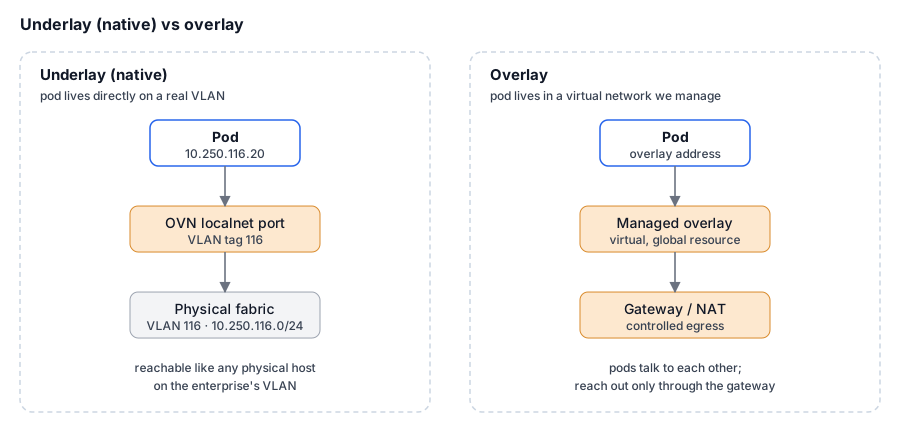
A quick note on vocabulary, since it’s shifted since. “Underlay” was the term we used at the time for a pod sitting directly on the physical network. Today you’d more often hear that called a native network. Same idea: the workload lives on the real network rather than in a virtual one layered above it. I’ll stick with “underlay” through this post because that’s what our annotations and code said, but read it as “native” if that’s the word you know.
A workload declared what it wanted per interface, in an annotation on the pod. Here’s the shape of it: one interface in underlay mode on VLAN 10, one in overlay mode on VLAN 192:
[
  {
    "mode": "underlay",
    "interface": {
      "dhcp": "true",
      "mac": "00:00:00:8a:62:c4",
      "ip": "10.0.0.2",
      "mask": "255.255.255.0",
      "gateway": "10.0.0.1",
      "name": "eth0",
      "metric": "0",
      "service_class": "bulk"
    },
    "vlan": { "tag": "10", "gateway": "10.0.2.254" }
  },
  {
    "mode": "overlay",
    "interface": {
      "dhcp": "false",
      "mac": "00:00:00:11:22:33",
      "ip": "192.168.1.2",
      "mask": "255.255.255.0",
      "gateway": "192.168.1.1",
      "name": "eth1",
      "metric": "1024",
      "service_class": "lowlatency"
    },
    "vlan": { "tag": "192", "gateway": "192.168.1.254" }
  }
]
Everything the enterprise cares about is right there in the declaration: which VLAN, which address, how it’s assigned, what QoS class. A pod could have several interfaces, each on a different VLAN with a different treatment, which is how a multi-homed server behaves on a real network. This is the network team’s vocabulary rendered as JSON. Nobody had to learn a CertaScale-specific model of what a network is.
VLANs, the way OVN does them
Under the hood, a VLAN on the underlay maps onto an OVN construct called a localnet port: a logical switch port that connects the logical network to a physical one, tagged with the VLAN ID. When a workload asked for VLAN 116, we created (or reused) the logical switch representing that VLAN, and its localnet port carried the 116 tag out to the physical fabric.

In OVN’s own view of the world, a VLAN’s topology looked roughly like this, a logical switch with a localnet port tagged 116, wired through a logical router out to the physical network:
switch (vlan116-...)
    port to-cluster
        type: router
        addresses: ["00:00:00:11:11:11 10.250.116.111/24"]
        router-port: to-external
    port vlan116-if-...
        type: localnet
        tag: 116
        addresses: ["unknown"]
router (rt-vlan116-...)
    port to-external
        mac: "00:00:00:11:11:11"
        networks: ["10.250.116.111/24"]
    nat
        external ip: "10.250.116.111"
        logical ip: "10.0.0.0/8"
        type: "snat"
The syntax doesn’t matter here. What matters is that OVN already understood VLAN-tagged connections to physical networks. We didn’t have to invent VLAN handling; we had to translate “this pod wants VLAN 116” into the OVN objects that make it real, then let ovn-northd and ovn-controller push it down to OpenFlow rules on each node. This is the leverage the previous post was about. The hard networking was already solved, and our job was mapping Kubernetes intent onto it.
Addressing: static and DHCP, because the enterprise uses both
Enterprises assign addresses two ways, and a workload had to support either.
Static is for the things that need a fixed, known address forever: the database everything points at, the service the firewall has an explicit rule for. The address is declared, and the workload comes up with exactly that address.
DHCP is for everything else, the workloads that just need an address on the right VLAN and don’t care which. The enterprise expectation carries a catch: a DHCP address should behave like a real DHCP lease, handed out by something that looks like a DHCP server on that segment.
For plain container workloads, honoring the declared address is straightforward, because we control the pod’s network namespace and can configure the interface directly. Virtual machines were the hard case, and they shaped the design. You can’t reach inside a guest VM to configure its interface; the guest brings itself up. So for VMs, DHCP wasn’t a convenience, it was the mechanism. We ran a DHCP server inside OVN for the VM’s segment, and the guest’s own DHCP client picked up the address, gateway, and routes exactly as it would on a physical network. From inside the VM, booting on our cloud was indistinguishable from booting on a real DHCP-served enterprise LAN.
QoS: don’t invent a scheme, implement the standard
QoS is where the “speak their language” principle paid off most cleanly. There was a real temptation to invent something, and a better option not to.
Enterprise networks classify traffic using Differentiated Services (DiffServ), encoding a class into the 6-bit DSCP field of the IP header. RFC 4594 defines a standard set of service classes and what each is for. Network engineers already think in these terms, and their switches and routers are already configured around them. So instead of designing a CertaScale QoS model, we implemented RFC 4594 directly inside the OVN logical switches, setting the DSCP field on traffic according to the class each interface declared.
The mapping we exposed was the RFC’s own set of twelve classes, each with its DSCP value and the kind of traffic it’s meant for:
| Service class | DSCP | Annotation value | Intended for |
|---|---|---|---|
| Network Control | 48 | networkcontrol | Routing and control-plane messages |
| Telephony | 46 | telephony | Voice, fixed-rate, low-latency |
| Signaling | 40 | signaling | Call/session signaling |
| Multimedia Conferencing | 38 | conferencing | Video conferencing, rate-adaptive |
| Real-Time Interactive | 32 | realtime | Interactive RTP/UDP streams |
| Multimedia Streaming | 30 | streaming | Buffered streaming, elastic rate |
| Broadcast Video | 24 | broadcast | Constant/variable-rate, inelastic |
| Low-Latency Data | 22 | lowlatency | Interactive, latency-sensitive apps |
| OAM | 16 | oam | Operations, administration, mgmt |
| High-Throughput Data | 14 | bulk | Long-lived elastic transfers |
| Low-Priority Data | 8 | lowpriority | Non-real-time, background |
| Standard | 0 | standard | Everything else |
You picked one per interface with the service_class field you saw in the annotation above. Tag an interface lowlatency and its traffic left marked DSCP 22; tag it bulk and it left marked 14, so the enterprise network gave the backup traffic and the interactive traffic the treatment its existing policy already prescribed for those markings.
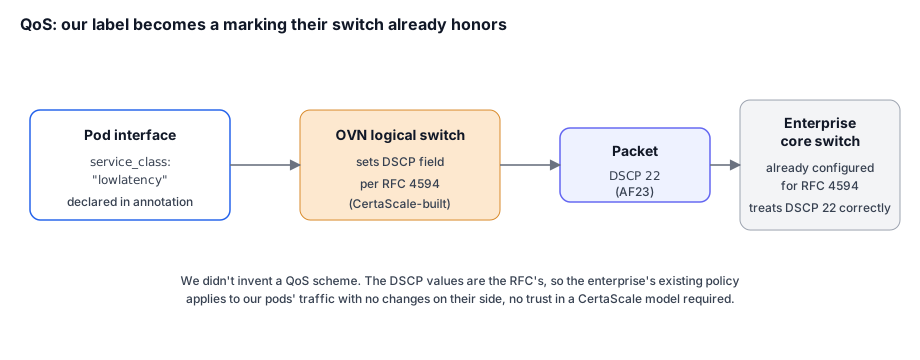
That’s the payoff of not inventing a scheme. The DSCP values weren’t ours; they’re the RFC’s. When a packet from one of our pods hit an enterprise’s core switch, that switch treated it correctly because it was already configured for RFC 4594, and always had been. We didn’t ask anyone to trust our QoS model. We spoke the one they already ran.
The principle, restated
Every decision in this layer came back to the same instinct: whatever enterprise network we’re dropped into is the source of truth, and our job is to extend it to pods, not to replace it with something cloud-native and hope the network team comes along.
- VLANs: their tags, carried on OVN
localnetports. - Addressing: static when they pin it, DHCP when they don’t, and DHCP that behaves like a real lease, especially for VMs that can’t be configured from outside.
- QoS: RFC 4594 DSCP, the exact classes their switches already honor.
None of it required an enterprise’s network team to learn a new model. A pod showed up on VLAN 116 with the right address and the right DSCP markings, and from the network’s point of view it was just another well-behaved host. That’s what made the product sellable into organizations that are, rightly, conservative about their networks, and it’s what let our customer promise “it integrates with your existing network” and mean it.
The next post inverts this philosophy. Where this one is about faithfully obeying whatever enterprise network we land in, the next is about a network model we chose ourselves, borrowed from how Google Cloud does addressing, for a capability nobody had put in the requirements but everyone wanted once they saw it: moving virtual machines between nodes without them noticing.