This is the fourth post in a series about CertaScale, the private cloud I helped build between 2016 and 2019. The previous post was about obedience: taking whatever enterprise network we were dropped into and extending it to pods on the network’s own terms. This post is the opposite. It’s about a network model we chose for ourselves, because we wanted a capability nobody had asked for.
That capability was live migration: moving a running workload from one node to another without it noticing. The thing standing in the way wasn’t CPU or memory state. It was the IP address.
Table of contents
Open Table of contents
- The problem migration has with addresses
- Borrowing the idea from Google Cloud
- /32 plus routes, on the pod side
- The address operator and a pool of CRDs
- What happens when a pod shows up, and when it leaves
- Making the route follow the address
- Virtual machines, again the hard case
- What it looked like in OVN
- Why this is the one I’m proudest of
The problem migration has with addresses
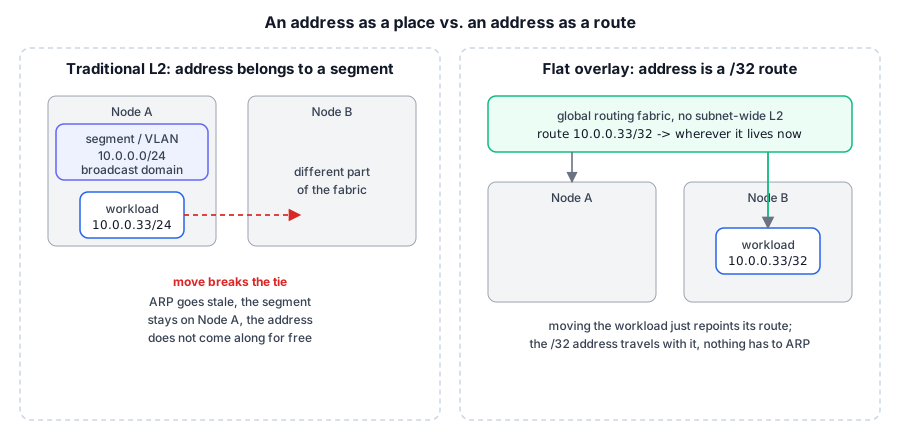
A normal L2 network ties an address to a place. A pod, or a VM, gets an IP that belongs to a subnet, and that subnet lives on a segment: a VLAN on a particular set of switch ports, a broadcast domain, an ARP table that says “this MAC is over here.” Move the workload to a different node and the address doesn’t come with it. The new node is on a different part of the fabric. ARP goes stale. Traffic keeps heading for where the workload used to be. You either renumber the workload, which every existing connection notices and hates, or you do increasingly elaborate things with gratuitous ARP and stretched L2 to pretend it never moved.
For a private cloud that wanted to slide VMs between physical hosts, that was the wall. The interesting state in a VM migration is memory, and KVM already knew how to shuttle memory around. The address was the thing that didn’t want to travel.
Borrowing the idea from Google Cloud
The way out came from looking at how the big clouds addressed machines, Google Cloud in particular.
On GCP there’s no subnet-wide layer 2 the way there is in a traditional network. Your VM has an address, but there isn’t a real broadcast domain full of neighbors it ARPs for. The network is a routing fabric: it knows a route to your specific address and delivers packets there, wherever “there” currently is. The address is a routing entry, not a fixed spot on a wire.
If an address is a /32 route rather than a member of an L2 segment pinned to one server, then moving the workload is just moving where that route points. Nothing has to ARP. Nothing has to believe a MAC teleported across the fabric. You update a route, and packets follow.
So I rebuilt an equivalent of that model on top of OVN and Kubernetes. We called it the flat overlay network. The internal description was blunt about what it is: a virtual version of a physical network. It provides connectivity for a project’s workloads, releases, and VM instances, and the overlay, together with its routes and firewall rules, is a global resource, not associated with any particular server. That was the whole point. A network that doesn’t belong to a server is a network a workload can carry with it.
/32 plus routes, on the pod side
The model shows up most concretely in how an interface is configured inside the workload. A normal subnet mask implies “everyone in this subnet is a local neighbor on my segment.” Instead of that, we gave the pod a host route: the address as a /32, and explicit routes out.
Our CNI driver configured an overlay interface in three steps. The address goes on as a /32:
ip addr add 10.0.0.33/32 dev eth0Then a route to the gateway, reachable directly on the device even though, by the /32 mask, nothing is nominally “local”:
route add 10.0.0.1 dev eth0Then the default route through that gateway:
route add default gw 10.0.0.1The /32 does the work here. The workload has no illusion of a local subnet full of peers. It has an address and it has routes. Every packet it sends goes up to the gateway, and the fabric decides where things live.
The address operator and a pool of CRDs
For the address to travel with a workload, something had to own addresses as first-class, durable objects, separate from any pod or any node. A pod is ephemeral. A node is a place. An address had to outlive both.
So addresses became Kubernetes custom resources, and a controller called the address operator managed them. The timing helped: this was 2017, Custom Resource Definitions had just landed in Kubernetes 1.7, and the operator pattern (a control loop paired with its own resource type) had a name and a couple of well-known examples. That’s a large part of why the design took this shape. The moment the platform let us define our own first-class object, an address stopped being something to compute on the fly and became a thing we could store, watch, and reconcile like anything else in the cluster. Each address was a CRD with roughly this shape:
// AddressSpec represents an address CRD.
type AddressSpec struct {
	ExternalGateway string `json:"gateway"`        // ip of mgmt-if, used by sdn-route-controller
	IPAddress       string `json:"ip"`             // ip assigned on the pod interface
	MACAddress      string `json:"mac"`            // mac assigned on the pod interface
	PodName         string `json:"pod-name"`       // pod that currently owns this address
	Host            string `json:"host"`           // node the address currently lives on
	Reserved        bool   `json:"reserved"`       // set by sdn-controller when it claims this CRD
	Deleted         bool   `json:"deleted"`        // set by sdn-controller when the pod is deleted
	DeletionTime    string `json:"deletion-time"`  // when the pod was deleted
	VLAN            VLAN   `json:"vlan"`
}

type VLAN struct {
	Tag         int       `json:"tag"`          // vlan number
	LocalSubnet net.IPNet `json:"local-subnet"` // subnet to draw addresses from
}
The operator’s job was to keep a warm pool ready. On startup it listed the address CRDs that already existed, found unused addresses in the overlay CIDR, and created CRDs until the pool held ten, each populated with a free IP, a freshly generated MAC, the host it lived on, and the external gateway, all marked Reserved: false. Then it did the same on a loop, every thirty seconds or so, refilling the pool back to ten so there was always a small supply of addresses on hand rather than one allocated from scratch the moment a pod needed it.
Keeping addresses as pooled objects, rather than computing them on the fly, is what made the rest of the design tractable. An address existed before any pod claimed it, and it could keep existing after a pod let it go.
What happens when a pod shows up, and when it leaves
The sdn-controller watched the Kubernetes API and reacted to pods coming and going. This is where an abstract address in the pool became a concrete address on a running workload.
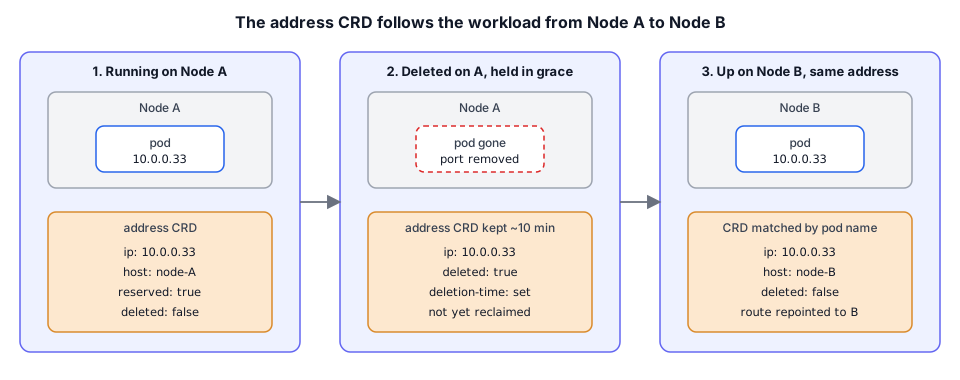
On a pod add event, the controller looked for an address CRD whose PodName already matched this pod, keyed as <namespace>-<name>. Two cases fall out of that lookup, and the first is the entire reason the design exists.
- The CRD already exists for this pod. This isn’t a fresh pod, it’s the same workload landing somewhere new: a migration. The controller doesn’t allocate anything. It updates the existing address, setting
Hostto the current node and clearing theDeletedflag. Same IP, same MAC, new location. The address followed the workload. - No CRD matches yet. This is a genuinely new workload. The controller lists unreserved addresses in the pool on the current node, claims one by setting
Reserved: trueand stamping the pod’s name onto it, reads the IP and MAC back out, creates the port on the OVN logical switch, and writes the address into the pod’s annotation so the CNI driver can configure the interface.
On a pod delete event, the controller found the matching CRD and, crucially, did not free it immediately. It set Deleted: true and recorded a DeletionTime, then removed the logical switch port. The address lingered, still carrying that pod’s name.
That lingering is deliberate, the counterpart to the migration case above. On its cleanup pass, the address operator only reclaimed a Deleted address once more than ten minutes had passed since its DeletionTime. During a migration the pod goes away on the old node before it comes up on the new one, so reclaiming the address the instant the old pod died would lose it. Holding it in a soft-deleted state for a grace period gave the new pod time to reclaim its own former address by name, and the whole move stayed invisible from the network’s side.
Making the route follow the address
Handing a workload the same IP on a new node only helps if traffic actually reaches it there. That was the sdn-route-controller’s job. It watched address CRDs for updates, and it cared about one transition: Reserved going from false to true, meaning an address had been claimed.
When that happened it programmed a route toward the address, and where the route pointed depended on where the address now lived relative to the host doing the routing:
- If the address’s external gateway was local to this host, the route pointed at the overlay interface directly. That’s a local network route, created automatically.
- If the external gateway was on a different host, the route pointed at that external gateway, steering traffic across to wherever the workload had landed.
No part of the system assumed a workload’s address sat on a fixed segment. When an address moved, claiming it on the new node updated the routes, and the fabric started delivering there. Move the route, and the packets follow.
Virtual machines, again the hard case
As with enterprise addressing in the previous post, plain containers were the easy half and VMs were where the design got tested. We control a container’s network namespace, so the CNI driver can configure the /32 and the routes directly. You can’t reach inside a guest VM to do that; the guest brings its own network up.
So, as with DHCP addressing on the underlay, we handed the overlay address to VMs over DHCP, with a DHCP server running inside OVN for each overlay interface. The lease carried the flat-network model into the guest:
cidr="<ip_address>/32"
router="<default_gw_ip>"
server_id="<default_gw_ip>"
server_mac="<mac_address>"
dns_server="<dns_server_ip>"
classless_static_route="{0.0.0.0/0,<default_gw_ip>}"
ms_classless_static_route="{0.0.0.0/0,<default_gw_ip>}"
lease_time="3600"
mtu="1500"
Notice the /32 again. The lease gives the guest a host address, a default route, and no notion of a local subnet, the same posture the CNI driver set up for containers.
One wrinkle is worth calling out, because it’s the kind of thing you only find by testing on real operating systems. With a /32 address there’s a chicken-and-egg problem: the default route points at a gateway the guest has no on-link route to reach. The clean fix would be to also hand the guest an explicit route to the gateway through its interface, the DHCP equivalent of that route add 10.0.0.1 dev eth0 line from the container path. We couldn’t. The interface name inside the VM is unknown to us and can’t be determined from outside, and OVN’s DHCP server didn’t support configuring an interface as a gateway anyway.
What saved us is that most DHCP clients, handed a host-only /32 address, install that on-link route to the gateway themselves. So it worked across the guests we cared about. Windows Server, Ubuntu, and CentOS were all fine. Alpine was the exception: its DHCP client didn’t do it, so we fixed the client and sent the change upstream, where it was merged into Alpine’s aports. “It works because the client is well-behaved” is a fragile-sounding sentence, but the RFC behavior was on our side. RFC 3442 defines the classless-static-route option we handed out, and a client that honors it installs the gateway route even from a /32. Where a client didn’t, the fix was a few lines to a package rather than a redesign.
What it looked like in OVN
Pulling back to the OVN objects, an overlay network attached to a VLAN looked roughly like this. There’s the overlay switch, the VLAN switch with its localnet port out to the physical fabric from the previous post, and a logical router tying them together with SNAT for egress:
switch (overlay-vlan116-...)
    port ovrl116-mgmt
        addresses: ["1a:e1:3f:f5:cb:de"]
    port to-gateway
        type: router
        addresses: ["00:00:00:22:22:22 10.0.3.253/22"]
        router-port: to-k8s
switch (vlan116-...)
    port to-cluster
        type: router
        addresses: ["00:00:00:11:11:11 10.250.116.111/24"]
        router-port: to-external
    port vlan116-if-...
        type: localnet
        tag: 116
router (rt-vlan116-...)
    port to-k8s
        networks: ["10.0.3.253/22"]
    port to-external
        networks: ["10.250.116.111/24"]
    nat
        external ip: "10.250.116.111"
        logical ip: "10.0.0.0/8"
        type: "snat"
    static routes:
        0.0.0.0/0        -> 10.250.116.1
        10.0.0.0/22      -> 10.0.3.254  (out to-k8s)
The overlay is its own switch, routed rather than bridged into the VLAN, with SNAT so overlay workloads could reach out while staying hidden behind the VLAN’s external address. The static routes are the fabric’s knowledge of where the overlay lives. By default the overlay drew its addresses from 100.64.0.0/10, the RFC 6598 shared-address space, so overlay addressing never collided with the enterprise’s own 10.0.0.0/8. Same OVN toolbox from the earlier posts, arranged to express “an address is a route, not a place.”
Why this is the one I’m proudest of
Every other part of the network layer was, at bottom, faithfulness: take what the enterprise has and honor it exactly. This part was a choice, and once we’d made the address into something that didn’t belong to any one node, live migration fell out of it almost for free.
The hard problem was never “copy the workload.” It was “keep the address believable after the workload moves.” Borrowing the routing-fabric model from how the big clouds address machines, then expressing it as /32 routes, a pool of address CRDs, and a grace period that let a departing workload keep its address long enough to reappear elsewhere, is what made a moving target look stationary to everything around it.
The next post finally opens the box we’ve been circling since the first one: running full virtual machines inside Kubernetes pods, in 2016, before Kata Containers existed to make it respectable. The flat network is half of what made VM migration work. The other half is the runtime that made a VM look like a pod in the first place.