This is the fifth post in a series about CertaScale, the private cloud I helped build between 2016 and 2019. The last three posts were about the network: the foundation we bet on, meeting enterprise networks on their own terms, and a flat overlay that let addresses move between nodes. This post finally opens the box I’ve been circling since the first one: running full virtual machines inside Kubernetes pods.
The date is the part that still surprises people. This worked on Kubernetes 1.2 in early 2016. Kata Containers didn’t launch until December 2017, and the Kubernetes API for running a pod on a different runtime came later still. We were doing this years before any of it existed to make it respectable.
Table of contents
Open Table of contents
- A pod doesn’t care what runs in it
- Where the pod runtime sat in the stack
- KVM inside the pod
- The hard part was never the CPU. It was the network.
- Migration, and why the flat network was half of it
- Doing this without RuntimeClass
- The runtime underneath, and the move to containerd
- Runtime as a choice: adding gVisor
- What this actually was
A pod doesn’t care what runs in it
Strip away everything the ecosystem later built on top of it, and a Kubernetes pod is two things:
- A namespace boundary. A set of Linux namespaces (PID, network, mount, and the rest) plus cgroups, wrapping one or more processes so they get their own view of the system and a bounded slice of its resources.
- A lifecycle Kubernetes knows how to manage. The scheduler places it on a node, the kubelet starts it, health checks watch it, and when it dies or gets evicted the control plane reacts.
Nothing in that description says the process inside has to be a web server. The pod doesn’t care what runs in it. It cares that something starts, stays alive, and can be killed. So we asked: what if the process inside the pod is a hypervisor, and the thing it keeps alive is a full virtual machine?
If you’re willing to run KVM inside the pod’s boundary and bridge the guest’s network out, you get a virtual machine that the scheduler places, the kubelet supervises, the network layer addresses, and Kubernetes tears down, exactly like it does for a container. A VM that behaves like a pod, because it is a pod, with a hypervisor for its main process.
Where the pod runtime sat in the stack
To see why this was even reachable, it helps to remember how a CertaScale node booted, because it was containers all the way down before any user workload showed up.
The chain went: bare metal, then CoreOS as the host OS, chosen precisely because it shipped a container runtime and almost nothing else. systemd came up as init and started the container runtime, then the kubelet (packaged as hyperkube) as a unit. The kubelet read static pod manifests out of /etc/kubernetes/manifests and brought up the control plane, kube-apiserver, scheduler, controller-manager, and etcd, as pods. Our own components, including the SDN pieces and Open vSwitch, came up the same way. By the time a user dragged a box onto the canvas, everything underneath was already a container.
So a “VM box” on the canvas turned into a pod spec like any other. The difference was entirely in what that pod ran and what it needed from the host to run it.
KVM inside the pod
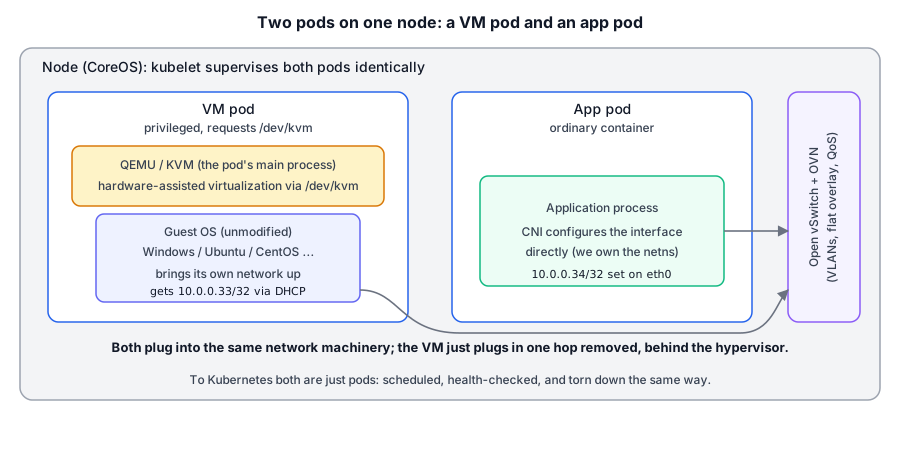
The main process in a VM pod wasn’t an application. It was a QEMU/KVM process booting a guest.
For that to work, the pod needed real access to the host’s virtualization hardware, which is not something an ordinary container gets. Concretely:
- The container needed
/dev/kvm, the device node that exposes the kernel’s KVM interface. Without it there’s no hardware-assisted virtualization and you’re back to slow emulation. - The pod ran privileged (or with a carefully widened capability set), because setting up a VM, its virtual devices, and its networking reaches past the tidy sandbox a normal container lives in.
- The node itself had to have virtualization enabled in firmware (VT-x/AMD-V) and the KVM kernel modules loaded, so the hardware path was actually available to hand into the pod.
Inside that boundary, QEMU booted a guest image the way it would on any KVM host: a disk backed by storage the platform provisioned, some virtual CPUs and memory carved out of the pod’s resource limits, virtual devices, and a NIC. From the guest operating system’s point of view, it was booting on a normal machine. It had no idea it was living inside a pod, inside a container runtime, inside Kubernetes, and that obliviousness is what made the whole thing work. You could boot Windows Server, Ubuntu, CentOS, whatever the customer wanted, unmodified, because none of them had to know where they were.
The pod’s contract with Kubernetes stayed intact through all of this. The QEMU process was the thing the kubelet supervised. If the VM’s main process exited, the pod’s main process exited, and Kubernetes saw a pod that had terminated and did whatever the pod’s policy said to do. Health, restarts, eviction, resource accounting, all of it flowed through the same machinery that manages a container, because the object being managed really was just a pod.
The hard part was never the CPU. It was the network.
This is the same wall the enterprise-network post and the flat-network post kept running into. With a plain container we control the network namespace and can configure the interface directly. With a VM, we can’t reach inside the guest, so the guest has to bring its own network up.
Our CNI driver still did its half of the job. When the VM pod was scheduled, the driver set up the pod’s network namespace and wired an interface into Open vSwitch, exactly as it did for a container. The difference is what lived on the other side of that interface. For a container, the other side is the application. For a VM, the other side is the hypervisor, and the guest sits one layer further in, behind a virtual NIC that QEMU presents.
So the packets’ path was: guest NIC, to the hypervisor, to the pod interface, into Open vSwitch, and from there into all the OVN logical topology the earlier posts described, VLAN localnet ports for underlay, the routed flat overlay for workloads we wanted to migrate, RFC 4594 DSCP marking for QoS, all of it. The VM plugged into the same network machinery as everything else. It just plugged in one hop removed.
And because we couldn’t configure the guest’s interface from outside, addressing happened the way it always did for VMs in this system: over DHCP, from a DHCP server running inside OVN. The guest’s own DHCP client asked for an address and got back the IP, gateway, and routes the platform had picked, whether that was a real enterprise VLAN address on the underlay or a /32 host address from the flat overlay. From inside the VM, booting on CertaScale was indistinguishable from booting on a physical DHCP-served LAN, which is exactly what let unmodified guest images work.
Migration, and why the flat network was half of it
The previous post was about making an address travel between nodes without the network noticing. This post is the other half of that story, because live migration of a VM needs two things to move together: the machine’s state, and its identity on the network.
KVM already knew how to move the state. Live migration of guest memory between hypervisors is old, well-trodden technology: you iteratively copy memory pages to the destination while the guest keeps running, then pause briefly to ship the last dirty pages and the CPU state, and resume on the other side. That part we got largely for free from the hypervisor.
The identity was the problem, and the flat network solved it. If a VM’s address is pinned to an L2 segment on one physical host, moving the VM breaks it: ARP goes stale, traffic keeps heading for the old node, and every open connection notices. But if the address is a /32 route in a global overlay that belongs to no particular server, then moving the VM is just repointing that route, and the same soft-deletion grace period that let a departing workload keep its address long enough to reappear elsewhere covered the window where the VM was down on the old node and not yet up on the new one.
Put the two halves together and you get the capability the whole flat-network detour existed for: a VM whose memory KVM shuttled between nodes, and whose IP the overlay carried along with it, moving between physical hosts without the guest, or anything talking to it, noticing.
What that looked like from outside was almost anticlimactic. Leave a ping running against the VM and drain its node, and the sequence continued through the move, maybe one reply late, no gap in the numbers. An SSH session into the guest stayed open across the migration; you kept typing and the shell kept answering, on a different physical server than the one you’d connected to. That’s the whole payoff of the detour: a VM that migrates the way it’s supposed to, riding on a network designed so it could.
Doing this without RuntimeClass
Here’s the part that dates the work. Today, if you want some pods to run on a different runtime, you define a RuntimeClass and set runtimeClassName in the pod spec, and Kubernetes routes the pod to the right runtime handler. It’s a clean, first-class mechanism. It also showed up as alpha in 1.12 in late 2018 and didn’t become a built-in resource until 1.14 in 2019. It did not exist for us.
In 2016 there was one runtime under the kubelet, and a pod was a pod. There was no supported API for “this pod is special, run it differently.” So “this pod is a VM” wasn’t a runtime selection the platform made through Kubernetes. It was a property of the pod’s own spec: the device access it requested, the privileges it held, the image it ran, and the machinery around it that the platform assembled. We were expressing, by hand and through our own components, an idea that Kubernetes wouldn’t grow a proper vocabulary for until years later. When RuntimeClass finally landed, it felt less like a new capability and more like the ecosystem officially naming something we’d already been living with.
The runtime underneath, and the move to containerd
For most of this the runtime under the kubelet was Docker, through the dockershim integration that Kubernetes shipped at the time. It worked, but it put extra hops in the path: kubelet to dockershim to Docker Engine to the containerd that Docker itself was built on.
Later we moved the platform to containerd directly, via its CRI plugin, which cut those extra hops out. The published numbers for the containerd 1.1 CRI integration versus Docker 18.03 with dockershim showed meaningfully lower pod startup latency and lower kubelet and runtime CPU and memory use, and our own testing showed the same shape. On a node that’s constantly starting and stopping pods, some of which boot entire operating systems, cutting daemon overhead and startup latency out of the path is not a rounding error.
That migration wasn’t just a tidy-up. It reworked the piece of our stack closest to the runtime: our CNI driver had to be brought in line with the current CNI spec so it would work under containerd’s CRI plugin rather than through Docker, and the various controllers that had been talking to the Docker API had to be moved off it. It was real work, but it left us on the runtime the rest of the ecosystem was converging on, and it opened the door to treating a pod’s runtime as something you could choose at all. That’s where gVisor comes in.
Runtime as a choice: adding gVisor
Running VMs as pods was our answer to a question that got louder as the platform matured: containers are not a sandbox. They share the host kernel, so a single kernel vulnerability can mean a container escape. For a private cloud running workloads of varying trust on shared nodes, that matters. A full VM answers it with the strongest boundary of the common options, hardware-level virtualization and a separate guest kernel, but it’s also the heaviest to run. Once a pod’s runtime was something we could choose rather than a fixed fact, we could offer boundaries short of a full VM too.
gVisor, which Google open-sourced in May 2018, is one such boundary: a user-space kernel written in Go that sits between the application and the host, intercepting a container’s system calls and servicing them itself instead of passing them straight through. That shrinks the slice of host kernel a container can actually touch. It’s neither a full VM nor plain seccomp-style filtering, but a third thing between them.
gVisor ships an OCI runtime called runsc, and because we’d moved to containerd, wiring it in was a configuration exercise rather than a runtime rewrite. You install runsc and its containerd shim, register the runtime in containerd’s config, and then, once RuntimeClass existed, expose it as a class that a pod could ask for:
apiVersion: node.k8s.io/v1beta1
kind: RuntimeClass
metadata:
  name: untrusted-workload
handler: runsc
A pod that set runtimeClassName: untrusted-workload ran under runsc and got gVisor’s isolation; everything else kept running under the normal runtime. You could confirm which one a container landed on by checking for gVisor’s fingerprint from inside it:
crictl exec ${CONTAINER_ID} dmesg | grep -i gvisorThe point isn’t gVisor specifically. It’s the spectrum. Once a pod’s runtime is something you can choose rather than a fixed fact, isolation becomes a dial: a plain container where you trust the workload and want full performance, gVisor where you want a stronger boundary at the cost of some system-call overhead, and a full KVM VM where you want the strongest isolation there is and don’t mind paying for it. Same platform, same pod abstraction, different amount of wall around the workload. We’d started at the heavy end of that dial out of necessity in 2016; by the time the ecosystem caught up, we could offer the whole range.
What this actually was
It’s tempting, in hindsight, to call this “we built Kata before Kata.” That’s not quite it, and the difference is instructive. Kata Containers, and later the RuntimeClass mechanism, made VM-backed pods a clean, supported, standardized thing: a runtime you install and select, with the ecosystem’s blessing. What we had was scrappier: a pod that requested /dev/kvm and privileges, ran a hypervisor as its main process, booted an unmodified guest, got its address over DHCP because we couldn’t reach inside it, and rode the flat network when it needed to move. We assembled the behavior out of parts, before the parts had names.
The underlying insight was the one the ecosystem eventually formalized: a pod is a lifecycle and a boundary, and Kubernetes doesn’t much care what runs inside it as long as the contract holds. Once that sinks in, “schedule a VM like a container” stops sounding exotic and starts sounding obvious. We just had to believe it a couple of years before there was a RuntimeClass to write it down in.
None of that surfaced to the person using CertaScale. They dragged a VM box onto the canvas the same way they dragged a container, and it scheduled, got an address, survived a node drain by moving to another host, and could be torn down, all through the same machinery. The box on the canvas didn’t say whether the wall around the workload was a namespace, a gVisor sandbox, or a full guest kernel. That was the point.
The next post leaves the control plane and the runtime behind and goes down to the packets themselves. When the company tried to reinvent itself as a 5G-edge box, “good enough” networking through the kernel suddenly wasn’t good enough: edge means line-rate on commodity hardware, and our data path topped out around 12 Gbps on 100 Gbps cards. Taking it out of the kernel with DPDK, and getting to roughly 60 Gbps on the same servers, is where the series goes next.